Slim Protective MacBook Sleeve: Fit & Daily Carry Tips
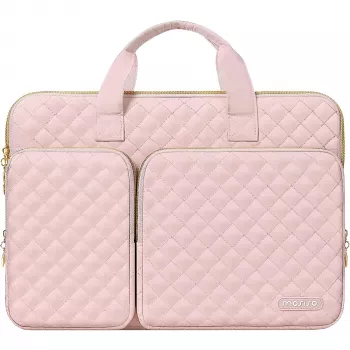
Premium Laptop Sleeve for MacBook Air & Pro 13–16 Inch with Protective Design
A well-made sleeve keeps a MacBook protected during commutes, class days, and travel while staying slim enough to slip into a backpack or tote. The right choice comes down to fit, padding and corner protection, zipper design, and durable materials that won’t scuff easily. Below is a practical guide to what matters most—plus an at-a-glance look at a streamlined option built for everyday carry.
What a Protective Sleeve Should Do Every Day
A sleeve earns its keep when it protects against the most common daily risks without turning your laptop into a bulky package.
- Reduce impact from bumps and short drops with a padded structure and reinforced edges that help absorb shock inside a bag.
- Prevent scratches on the aluminum finish and around the display by adding a barrier between your MacBook and keys, chargers, and metal bag hardware.
- Add light weather resistance so brief drizzle, coffee shop condensation, or a damp umbrella doesn’t immediately soak through to the device.
- Stay slim and easy to carry so it slides in and out of backpacks cleanly instead of snagging on corners or seams.
Getting the Right Fit for MacBook Air and MacBook Pro
“13-inch” and “15-inch” are starting points, not guarantees. Different MacBook generations can share a screen size while having slightly different footprints and thickness.
- Match the sleeve to your MacBook’s exact model range (screen size plus generation) to avoid tight corners or wasted space.
- Look for a small tolerance—easy in/out without forcing the zipper. Too tight can stress seams; too loose can allow shifting and corner impacts.
- Account for added bulk if you use a hard shell case or thicker skin.
- Be realistic about accessories: if you need to carry a charger, avoid pressing it directly against the laptop inside the sleeve.
Quick Fit Checks Before Buying
| Check | Why it matters | What to do |
|---|---|---|
| Model & year | Different generations can vary in dimensions | Compare the MacBook’s tech specs to the sleeve’s supported range |
| Thickness with case | Hard shells can add bulk | Measure laptop thickness with the case on |
| Closure clearance | Tight corners stress zippers and seams | Look for smooth insertion with light resistance, not force |
| Accessory carry | Bulky items can press on the display | Use a separate pouch if carrying charger/adapter |
Need to confirm your exact model before choosing a sleeve size? Apple’s reference guides can help you identify your Mac and verify dimensions via technical specs: Apple Support — Identify your MacBook model, plus the MacBook Air Technical Specifications and MacBook Pro Technical Specifications.
Protection Features That Matter Most
Not all padding and closures are created equal. Small design choices can make a big difference when your laptop is bouncing around in a bag.
- Padding density (not just thickness): quality padding rebounds and holds its shape after pressure, helping keep the sleeve protective over time.
- Corner reinforcement: corners are the first contact points when a bag is set down; reinforcement helps reduce the chance of dings and dents.
- Soft lining: a smooth interior reduces micro-scratches and limits abrasion from fine dust.
- Closure design: covered zipper tracks and clean zipper paths help reduce the chance of zipper-to-device contact.
- Water resistance: treated outer fabric helps with splashes and light rain; for heavy downpours, a sealed waterproof layer is the real solution.
Materials and Build Details to Look For
A sleeve is a wear item—constantly rubbing against backpack fabric, desk edges, seat arms, and zipper pulls. Durable construction keeps it looking good and working smoothly.
- Outer fabric: tightly woven, abrasion-resistant materials handle scuffs and daily friction better.
- Stitching and seams: even stitching matters most at corners and zipper ends where tension concentrates.
- Zipper quality: a smooth glide prevents snagging; protective zipper lips/garages reduce accidental finish contact.
- Light structure: a sleeve with a bit of rigidity helps prevent collapse and compression when your backpack is packed tight.
Spotlight: Premium Laptop Sleeve for MacBook Air Pro 13–16 Inch
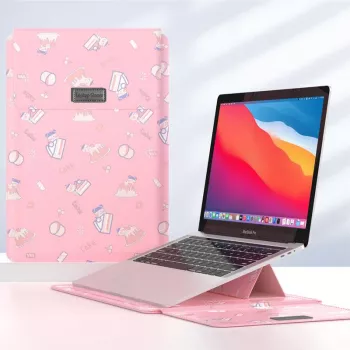
If you want a straightforward sleeve that stays slim while covering the everyday risks of commuting and campus carry, the Premium Laptop Sleeve for MacBook Air Pro 13–16 Inch with Protective Design is built around that balance. It’s designed for common MacBook sizes in the 13–16 inch range, making it a practical option when you’re looking for protective padding without stepping up to a bulky briefcase-style case.
At-a-Glance
| Detail | Value |
|---|---|
| Product | Premium Laptop Sleeve for MacBook Air Pro 13-16 Inch with Protective Design |
| Price | 24.51 USD |
| Availability | In stock |
| Product page | View product details |
For a compact desk or travel add-on that pairs well with a Mac setup, consider the Wireless Bluetooth Backlit Number Pad for Apple Devices—handy for spreadsheets, budgeting, and quick numeric entry without carrying a full-size keyboard.
How to Pack a Sleeve in a Backpack Without Crushing the Laptop
Care and Longevity Tips
FAQ
Will a 13-inch sleeve fit a MacBook Pro with a hard shell case?
Sometimes, but hard shell cases add thickness and corner bulk that can make a snug sleeve feel too tight. Measure your MacBook with the case on and choose a sleeve with enough clearance so the zipper closes without pressing on edges or corners.
Is a sleeve enough protection for daily commuting?
A sleeve is great for preventing scratches and handling light bumps inside a bag, but it won’t fully protect against heavy crushing or major drops. Pair it with smart packing and a structured backpack for more dependable daily protection.
How should a laptop sleeve be cleaned?
Spot-clean with mild soap and water and avoid harsh chemicals that can damage coatings or fabrics. Let the sleeve air-dry completely and keep the interior free of grit to reduce abrasion on the laptop.













Leave a comment