Ergonomic Racing Gaming Chair: Flip-Up Arms + Lumbar
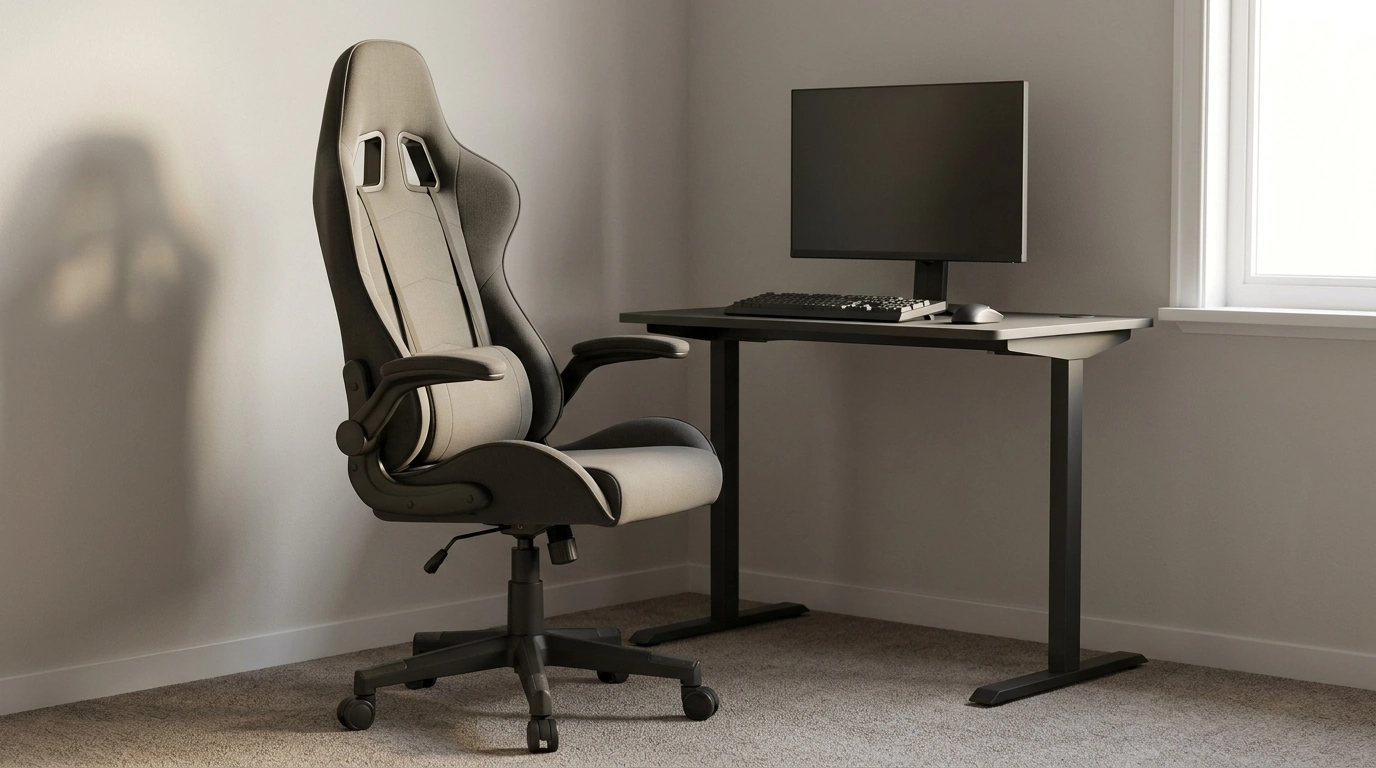
Long sessions at a desk can feel great for focus—and rough on the body. Our ergonomic racing gaming chair is built to keep posture supported while staying flexible for different desk setups, play styles, and room layouts. With adjustable height, flip-up armrests, and dedicated lumbar support, it’s a practical upgrade for gaming, studying, and everyday computer work.
What this chair is made to solve
- Helps reduce the slouch-and-hunch cycle by pairing a racing-style backrest with lumbar support.
- Supports better alignment when switching between tasks (keyboard/mouse work, controller play, meetings).
- Fits more desk scenarios thanks to adjustable height and armrests that can flip up when space is tight.
- Designed for people who want a supportive seat without turning the setup into a bulky “office-only” look.
At-a-glance features that matter day to day
- Adjustable seat height to line up elbows with the desk and keep feet grounded.
- Flip-up armrests to slide closer to the desk, tuck the chair under, or free up side space for guitar, drawing tablet, or wider mouse movement.
- Lumbar support to encourage a neutral lower-back curve during long sessions.
- Racing-inspired profile that supports the upper back and shoulders while staying at home in a gaming or home office setup.
Quick setup wins (feature → what it helps with)
| Feature | What it helps you do | Best for |
|---|---|---|
| Adjustable height | Match chair height to desk and monitor posture | Shared desks, different user heights |
| Flip-up armrests | Create more room or get closer to the desk edge | Small rooms, compact desks, wider mouse movement |
| Lumbar support | Maintain lower-back support instead of sinking into a slouch | Long gaming nights, study sessions, remote work |
| Racing-style back | Support upper back/shoulders with a more “hugged” feel | Players who lean into the screen or sit upright for aim |
Dialing in comfort: how to set it up in minutes
- Start with height: raise or lower the seat until your feet rest flat and your knees feel comfortably bent (not tucked sharply underneath).
- Bring the chair close: with armrests flipped down, check that your forearms can rest lightly while shoulders stay relaxed; flip them up if they block you from getting close to the desk.
- Use lumbar support as a guide: position it so the lower back feels “filled in,” not pushed forward aggressively.
- Re-check screen distance: once seated, adjust monitor height/distance so your neck isn’t craning forward.
If you want a quick ergonomics reference for desk posture basics, OSHA’s guidance on computer workstations is a solid starting point: OSHA – Computer Workstations eTool. For a practical, plain-language walkthrough of seating and screen setup, Mayo Clinic also outlines useful checkpoints: Mayo Clinic – Office ergonomics: Your how-to guide.
Flip-up armrests: small feature, big flexibility
- Cleaner desk approach: flip up the armrests to pull the chair in closer, especially helpful with shallow desks where you otherwise perch forward.
- Space-saving storage: armrests up makes it easier to tuck the chair under a desk when the room doubles as a bedroom or living space.
- Movement freedom: armrests up can reduce side contact during large mouse swipes, rhythm games, or creative work like drawing.
- Comfort choice: switch between arm support (down) and open posture (up) without committing to one style all day.
Lumbar support for longer sessions without the “after” feeling
- Encourages a neutral spine position so the lower back isn’t doing all the work.
- Pairs well with standing stretch breaks: when sitting again, support helps you settle back into a better posture faster.
- Useful beyond gaming: editing, studying, customer support shifts, and any task that keeps attention locked on screen.
Comfort still benefits from variety—changing positions and taking short movement breaks reduces repetitive strain over time. If you want deeper context on how ergonomics connects to musculoskeletal discomfort, CDC/NIOSH provides an accessible overview: CDC/NIOSH – Ergonomics and Musculoskeletal Disorders.
Who this chair fits best
- Gamers who alternate between upright focus and relaxed lean-back moments.
- Students building an all-in-one desk setup that has to work for work, play, and calls.
- Remote workers who want ergonomic support with a sportier style than a traditional office chair.
- Small-space setups that benefit from flip-up armrests to save inches and reduce clutter.
Complete the desk setup (simple add-ons that make a difference)
- Add a dedicated number pad for faster spreadsheet work or budgeting without changing keyboards.
- Keep essentials within reach: reduce repeated twisting by placing chargers, notebooks, and controllers in the same “easy reach” zone.
In-stock picks from our team
- Ergonomic Racing Gaming Chair with Adjustable Height, Flip-Up Armrests, and Lumbar Support ($108.17)
- Wireless Bluetooth Backlit Number Pad for Apple Devices ($32.51)
FAQ
How do flip-up armrests help at a desk?
They let you slide closer to the desk edge without the armrests bumping the desktop, and they make it easier to tuck the chair away in a small room. You can also flip them up to free side-to-side arm movement, then drop them down again when you want forearm support.
What’s the easiest way to set the right chair height?
Set the seat so your feet rest flat and your knees are comfortably bent, then check that your elbows sit near desk height with relaxed shoulders. After 10–15 minutes, make a small adjustment if you notice you’re reaching up to the desk or sinking down into it.
Is lumbar support useful if posture changes throughout the day?
Yes—lumbar support helps you “reset” into a better position when you sit back down after breaks or task changes. It supports your lower back during longer sessions and works best alongside regular standing and stretching.













Leave a comment