Magnetic Desk Stand for iPhone & iPad: Clean, Stable Setup
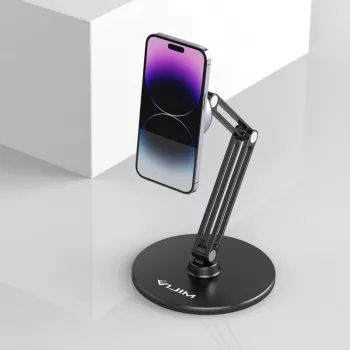
Magnetic Desk Phone & Tablet Holder Stand for Apple Devices
A magnetic desk stand helps keep an iPhone or iPad stable, visible, and easy to grab—without turning a workspace into a tangle of devices and cables. Whether it’s for quick message checks, a steady FaceTime call, or using an iPad as a second screen for notes, a magnetic holder creates a reliable “home base” on your desk so your device stays where you expect it to be.
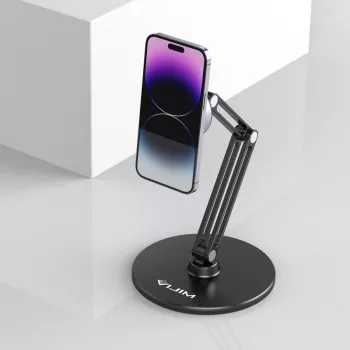
If you’re upgrading a home office or tightening up a work-from-anywhere setup, the Magnetic Desk Phone & Tablet Holder Stand for Apple Devices is designed to keep Apple devices within comfortable view and reach while supporting everyday tapping, swiping, and quick pick-ups.
What a Magnetic Desk Stand Solves on a Daily Setup
Most desk frustration isn’t about the device—it’s about where it ends up during the day. A magnetic stand addresses the small, repeated annoyances that add up over long work sessions.
- Reduces neck strain: Lifting the screen closer to eye level can make quick checks (messages, calendars, notifications) less “head-down,” especially during video calls.
- Keeps a predictable parking spot: Instead of sliding around the desk or disappearing under papers, your phone/tablet stays anchored in one location.
- Smoother transitions: Pick up the phone to reply, then snap it back onto the stand without fussing with clamps or alignment.
- A cleaner workspace: With the device upright, there’s more usable desk surface for a laptop, keyboard, notebook, or coffee mug.
Highlights to Look for in the Stand’s Design
Not all magnetic holders behave the same once you actually start interacting with the screen. These practical design points matter most once the stand becomes part of your routine.
- Confident magnetic hold strength: The attachment should feel secure during normal taps and swipes, while still allowing one-handed removal.
- Stable base: A solid base reduces wobble and helps prevent tipping when you touch the top edge of the device.
- Angle and orientation flexibility: Portrait is great for reading and chat; landscape is ideal for video, recipes, and presentations.
- Scratch-conscious contact surface: Look for smooth, device-friendly materials where the device meets the stand, especially if you dock/undock often.
- Desk-friendly footprint: A compact footprint helps it fit beside a keyboard without crowding a trackpad or notebook.
Best Use Cases at Home and at Work
A magnetic stand shines when your day includes frequent glance-and-go moments, along with longer stretches where you need the screen visible but not in your hands.
- Video calls and meetings: Place the camera at a more natural height so you’re not looking down the entire time, and keep the device steady while you talk.
- Second-screen reference: Keep chat, timers, to-do lists, or meeting notes visible while working on a laptop.
- Content viewing: Get stable landscape placement for tutorials, streaming, or a cooking recipe without propping your device on random objects.
- Charging station pairing: Route a cable neatly so it doesn’t tug the device or run across the workspace.
- Desk organization: Reduce the chance of accidental knocks and spills by eliminating “device piles.”
Compatibility and Setup Checklist for Apple Devices
A great experience depends on correct magnetic alignment and a stable surface. Before you settle into daily use, run through these quick checks.
For Apple-specific guidance on magnetic accessories, review Apple’s documentation, including Apple Support and Apple’s overview of MagSafe technology.
Comfort and Ergonomics Tips for Better Screen Positioning
Small adjustments can make a noticeable difference in comfort—especially if your phone or iPad is serving as a “mini monitor” during the workday. For broader ergonomics principles, NIOSH offers workstation guidance at cdc.gov/niosh.
Quick Comparison: What to Check Before Buying
| Feature | Why it matters | What to verify |
|---|---|---|
| Magnetic attachment | Prevents slips during touch input | Device/case supports magnetic alignment; hold feels secure with normal tapping |
| Base stability | Avoids tipping on small desks | Base stays planted when swiping near screen edges |
| Angle/orientation | Improves comfort for calls and reading | Portrait and landscape positioning; tilt holds without drifting |
| Surface protection | Keeps devices looking new | Contact area is smooth; no sharp edges or abrasive pads |
| Cable friendliness | Reduces clutter and tugging | Space for a cable to bend naturally without pulling the device |
Care, Safety, and Placement Notes
Desk Pairings That Make the Setup Feel Complete
- Speed up number-heavy tasks: Pair a tidy desk layout with a Wireless Bluetooth Backlit Number Pad for Apple Devices for spreadsheets, accounting, and data entry.
- Support all-day wearables: If your day blends desk time with movement, an Apple Watch Silicone Sport Strap can help keep an Apple Watch comfortable through work and workouts.
- Create a consistent “drop zone”: Use the stand as the default place your phone returns to—helpful for focus, notifications, and not misplacing your device under papers.
FAQ
Will a magnetic stand work with an iPhone or iPad that has a case?
Yes, as long as the case is magnetic-compatible and properly aligned with the magnet ring. Very thick or misaligned cases can weaken the hold, so it’s smart to test attachment strength with normal tapping before relying on it daily.
Can it be used in landscape mode for video calls or watching videos?
Many magnetic desk stands support landscape use, but stability depends on the base and how securely the angle holds. Check that the device stays steady when you tap the screen in landscape and that the stand doesn’t drift or tip.
Is it safe to keep a phone on magnets for long periods?
Modern iPhones are designed to work with magnetic accessories, including MagSafe-compatible products, during everyday use. For the most up-to-date guidance, follow Apple’s recommendations for magnetic accessories and normal handling.













Leave a comment