Non-Slip Jelly Apple Pencil Cover: Grip, Fit, Care

Non-Slip Jelly Cover for Apple Pencil: A Better Grip for Notes, Sketches, and Long Sessions
A soft jelly sleeve can make Apple Pencil feel more secure, more comfortable, and easier to control—especially during long note-taking or drawing sessions. The right cover adds friction where smooth plastic can get slippery, helps reduce tiny grip shifts, and provides light protection from everyday scuffs. Below is a practical guide to what a non-slip jelly cover changes, who benefits most, how to confirm fit for your setup, and how to install and care for it without affecting the Pencil’s normal responsiveness.
What a non-slip jelly cover changes in day-to-day use
A jelly-style sleeve is a small upgrade, but it can change how Apple Pencil behaves in common situations like classrooms, commutes, and desk work.
- More grip, less slipping: Added friction helps when hands are sweaty, dry, or covered with lotion—conditions that can make a smooth barrel feel hard to hold steady.
- Slight cushioning for comfort: A thin layer can take the edge off a tight pinch grip and make longer sessions feel less fatiguing.
- Helps prevent desk rolling: Many covers subtly reduce rolling so the Pencil is less likely to travel off a slanted surface.
- Basic scuff protection: It can reduce cosmetic wear from minor bumps, bag carry, or contact with keys and zippers.
- More consistent control: With fewer micro-slips, line starts, small curves, and handwriting strokes often feel more repeatable.
Comfort and control: who benefits most
Not everyone needs a sleeve, but certain users tend to notice the difference quickly.
- Students and note-takers: Long lectures and study sessions can expose grip fatigue and sweaty-hand slipping.
- Artists and designers: Shading, fine line work, and detail edits often feel steadier when finger placement doesn’t drift.
- People with low-friction grip: Very dry hands or naturally slick skin can reduce control on glossy barrels.
- Tight grippers: A slightly thicker feel can reduce pinch pressure and help the hand relax.
- Shared devices: A removable cover is an easy, non-permanent way to improve handling for multiple users.
Fit and compatibility checks before buying
Apple Pencil models and charging methods vary. A cover that feels great in-hand can still be the wrong choice if it blocks charging, weakens magnetic attachment, or doesn’t fit your case slot. Apple’s own model overview is a helpful reference when confirming which Pencil you have (Apple Support — Apple Pencil).
Quick compatibility checklist
| Setup | What to confirm with a jelly cover | Common issue to avoid |
|---|---|---|
| Magnetic attach/charge | Sleeve keeps the magnetic/charging edge clear | Cover blocks charging or weakens magnetic hold |
| Keyboard case with Pencil slot | Final thickness fits the slot | Pencil won’t fit or rubs when inserting/removing |
| Pencil loop/elastic holder | Loop diameter accommodates the cover | Loop stretches out or cover tears from friction |
| Desk use (no holder) | Anti-roll benefit is noticeable | Sleeve too slick or too thin to help |
Before purchasing, also consider how you store the Pencil. If you regularly slide it into a tight pocket, stand, or molded tray, even a small increase in diameter can matter.
Material feel, thickness, and grip patterns
Jelly and silicone-like materials are popular because they increase friction without making the Pencil feel “sticky” in a distracting way—when the material and finish are chosen well.
- Higher friction than bare plastic: Soft-touch materials resist slip when your grip angle changes.
- Thickness affects storage: A slightly thicker sleeve can feel more comfortable but may conflict with Pencil slots and docks.
- Texture can beat bulk: Ribbed or patterned surfaces often improve grip without adding much diameter.
- Lint attraction varies: Very soft materials can pick up pocket lint; matte finishes tend to look cleaner longer.
- Snug, even fit matters: Bunching or uneven seams can distract during precise strokes.
Installing the cover without stretching or tearing
A good install looks “invisible”—no twists, no ripples, and cutouts aligned with the right edges.
Care and cleaning
Regular cleaning keeps the cover feeling fresh and prevents residue that can feel tacky. Apple also provides general guidance for cleaning accessories and devices (Apple Support — Clean Apple products).
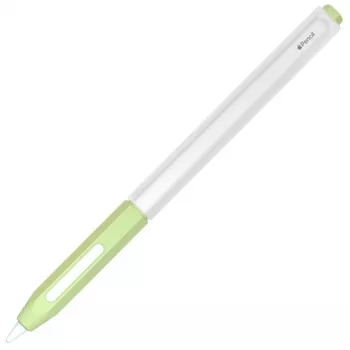
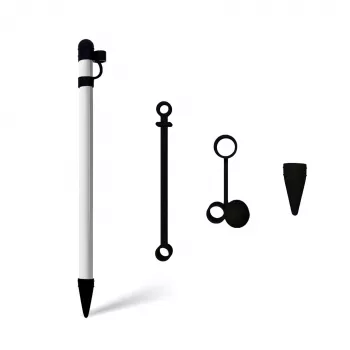
Product option: Non-Slip Jelly Cover for Apple Pencil
Non-Slip Jelly Cover for Apple Pencil
Small add-ons that pair well with Apple devices
- Faster number entry for spreadsheets: A compact keypad can be a big quality-of-life upgrade for budgeting, invoicing, and finance-heavy tasks. See Wireless Bluetooth Backlit Number Pad for Apple Devices.
- Comfortable daily wear for Apple Watch: A soft strap can reduce irritation during workouts or all-day wear. See Apple Watch Silicone Sport Strap.
- Less clutter, more consistency: Choosing a few accessories you’ll use daily beats collecting extras that don’t fit your routine.
FAQ
Will a jelly cover affect Apple Pencil charging or magnetic attachment?
It depends on your Apple Pencil generation and the sleeve design. If the cover blocks the charging edge or adds too much thickness, it can reduce magnetic hold or prevent charging, especially with magnetic attach/charge models. Confirm the cover has the right cutouts and test it with your case or keyboard dock.
Can a non-slip cover improve handwriting and drawing control?
Often, yes—added friction and a slightly larger diameter can stabilize your grip and reduce micro-slips that affect line starts and consistency. Results vary by grip style, and it won’t change the tip’s performance on the screen, but it can make control feel more repeatable over long sessions.
How should a jelly cover be cleaned without damaging it?
Wash it with mild soap and warm water, rinse thoroughly, and let it air-dry completely before reinstalling. Avoid alcohol and strong solvents that can degrade jelly materials, and replace the sleeve if it loosens significantly or develops tears near edges or cutouts.













Leave a comment