Portable Podcast Studio Kit: Condenser Mic + Mixer

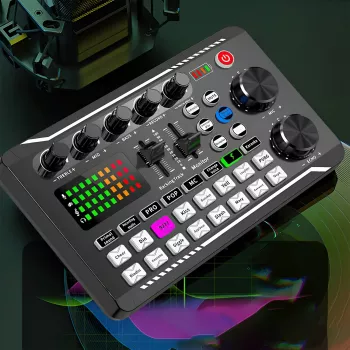
Portable Podcast Studio Kit with Condenser Mic & Sound Mixer for Live Recording
A compact recording setup can make the difference between a rough voice memo and a publish-ready episode. A portable studio kit that pairs a condenser microphone with a sound mixer gives you hands-on control over vocal clarity, music beds, and live sound cues—without being tied to a full-size studio. Whether you’re recording at a desk, in a shared space, or broadcasting a live session, the right signal path and level-setting habits help you sound consistent from the first take. For more guidance, see Building a Home Recording Studio? Here’s What You Need..
What This Kit Is Built For
This style of kit is designed for creators who need better voice capture and more control than a built-in phone or laptop microphone can offer. It fits naturally into fast, repeatable workflows where you want to hear what’s happening as you record—then make small adjustments before audio problems become permanent. For further reading, see Guides: Creative Media: Audio.
- Solo podcasts, interviews, and co-hosted sessions that need clearer voice capture than a phone or laptop mic
- Live recording workflows where levels, monitoring, and basic processing must happen on the spot
- Streaming-style setups that mix voice with background audio or sound cues
- Mobile creators who want a small footprint and quick setup without a full studio rack
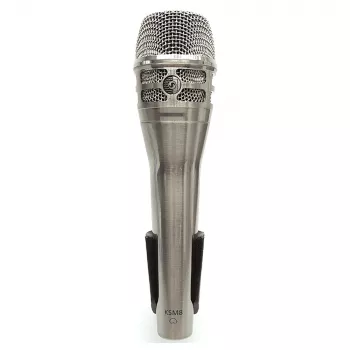
For a ready-to-go option, the Portable Podcast Studio Kit with Condenser Mic & Sound Mixer for Live Recording keeps the essentials in one compact package, making it easier to set up consistently across different locations.
What’s Included and How the Pieces Work Together
The core idea is simple: capture voice with a condenser microphone, shape and balance signals using a mixer, and monitor in real time so you can catch issues early. Condenser microphones are known for detailed pickup, which is ideal for spoken-word content—especially when you control distance and gain carefully. If you want a quick overview of condenser behavior versus other mic types, Shure’s primer is a helpful reference: Dynamic vs. Condenser Microphones.
- Condenser microphone for detailed vocal capture (best results when positioned close and slightly off-axis)
- Sound mixer interface to control gain, overall volume, and blend multiple audio sources
- Monitoring path (headphones/speaker depending on setup) to hear levels and catch clipping before it ruins a take
- Connectivity for common creator devices (phone, tablet, laptop) so recording can happen anywhere
- Practical workflow: set mic level first, then set output/recording level, then add any sound effects or background audio last
Signal Flow Checklist for Clean Live Recording
| Step | What to Do | Why It Matters |
|---|---|---|
| 1 | Place the mic 4–8 inches from the mouth, slightly to the side | Reduces plosives and harsh breath noise |
| 2 | Set input gain while speaking at real volume | Prevents distortion and keeps noise low |
| 3 | Monitor with headphones during a test recording | Catches hum, clipping, and imbalanced audio early |
| 4 | Adjust mixer output to keep peaks under control | Avoids overloaded recordings and streaming glitches |
| 5 | Add background audio/effects at low level | Maintains speech clarity and listener comfort |
Sound Quality: What to Expect in Real-World Use
In typical home or office environments, you can expect a noticeable jump in presence and intelligibility compared with built-in microphones—especially when you keep mic placement consistent. The mixer’s biggest advantage is control: instead of “fixing it later,” you can ride levels and prevent problems during the session.
If your workflow includes editing after the fact, a reliable editor can polish the final take, but it can’t fully undo clipping or heavy distortion. Adobe’s recording and editing basics provide a practical overview of what can be fixed and what should be prevented during capture: Adobe Audition: Audio recording and editing basics.
Best Practices for Live Recording and Streaming
Setup Scenarios
Phone-first mobile kit
Laptop recording
Use the mixer as the front end for voice plus an additional source while recording into software. If you do a lot of editing or logging timestamps, a small accessory like the Wireless Bluetooth Backlit Number Pad for Apple Devices can make shortcuts and numeric entry easier during production sessions.
Live session with music or cues
Route voice plus background audio through the mixer so the outgoing stream stays balanced without relying on heavy post-production. If you want a lightweight audio source for beds or references on the go, the Mini Pocket DAB/DAB+ FM Radio MP3 Player with Speaker & Rechargeable Battery can serve as a portable playback option depending on your routing needs.
Shared space recording
Care, Portability, and Quick Troubleshooting
Who This Kit Fits Best
If the goal is a small, practical rig that can travel easily and help you manage levels live, start with the Portable Podcast Studio Kit with Condenser Mic & Sound Mixer for Live Recording and build your routine around consistent mic placement and conservative gain.
FAQ
Does a condenser microphone pick up more background noise?
Yes, condenser mics are sensitive and can capture more room sound. Keep the mic close, choose a quieter space, add soft furnishings to reduce reflections, and use conservative gain to keep background noise under control.
How can clipping be avoided during live recording?
Set input gain while speaking at real volume and leave headroom for louder moments. Monitor with headphones, and if you hear crunchiness or see peaks hitting the top, lower the input gain immediately.
Can voice and music be recorded at the same time with a mixer?
Yes, mixers are designed to blend multiple sources at once. Keep music low under speech, test the balance before going live, and prioritize vocal clarity so listeners don’t strain to understand the words.













Leave a comment