Vertical Wireless Ergonomic Mouse for Mac/PC (Adjustable DPI)
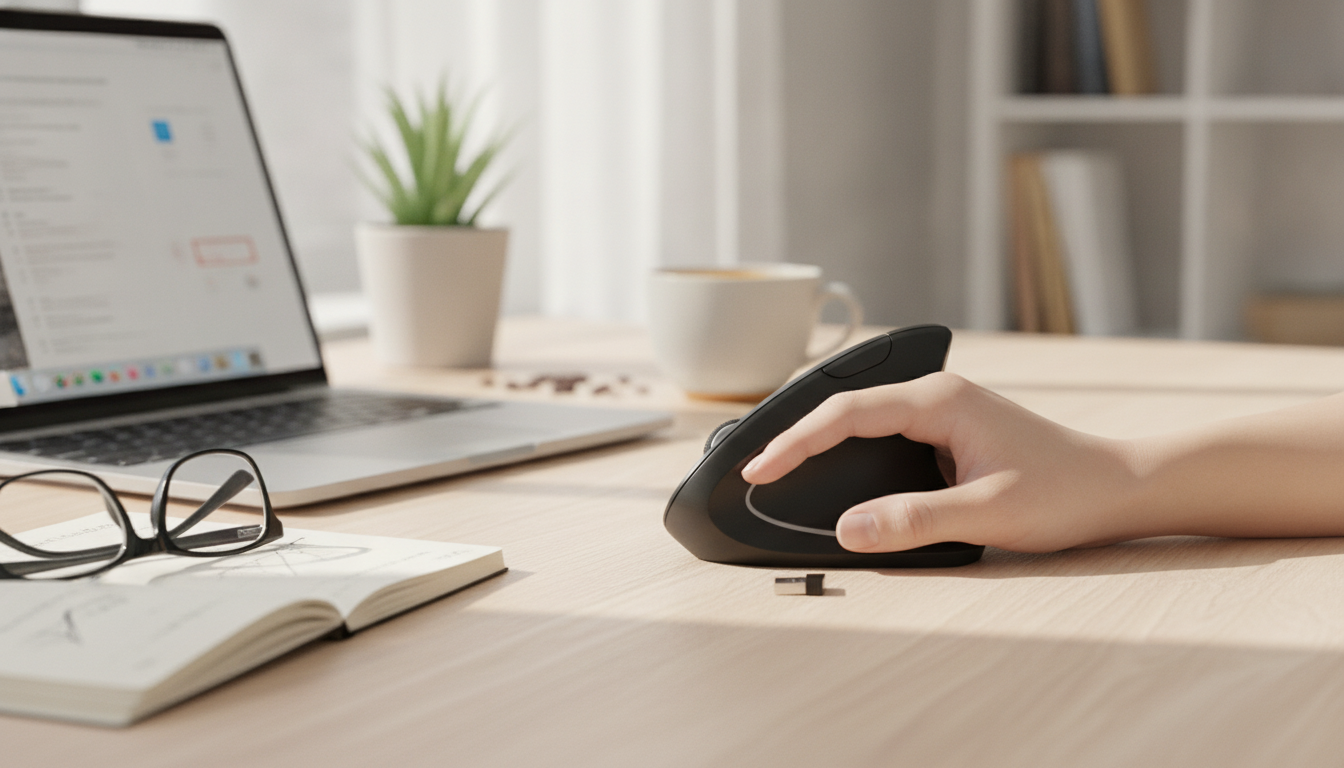
Vertical Ergonomic Wireless Mouse with Adjustable DPI for Mac and PC
A vertical mouse can help keep the wrist in a more neutral “handshake” position during long work sessions, while adjustable DPI lets cursor speed match different tasks like spreadsheets, design, or everyday browsing. This guide breaks down comfort factors, setup basics for Mac and Windows, and what to look for in daily use.
What Makes a Vertical Mouse Different
Unlike a traditional flat mouse that turns the forearm inward, a vertical ergonomic mouse is shaped to support a handshake-style grip. That subtle angle shift can reduce forearm rotation for many people and may feel more natural during extended computer use.
- Handshake-style grip: Often reduces forearm pronation compared with a flat mouse.
- Encourages a lighter grip: Many users find it easier to relax the hand, especially when the mouse fits well and glides smoothly.
- Expect an adjustment period: It’s common to feel slower for a few days while muscle memory catches up (especially for fine cursor placement).
- Desk setup matters: The biggest comfort gains usually come when the mouse is paired with good chair height and forearm support.
For workstation positioning basics, the ergonomics guidance from NIOSH and the OSHA computer workstations eTool can help you dial in chair height, monitor placement, and neutral wrist posture.
Adjustable DPI: Picking the Right Cursor Speed
DPI (dots per inch) is a practical way to think about cursor sensitivity: higher DPI usually means the pointer travels farther with less hand movement. A DPI button is most helpful when switching between tasks—like careful spreadsheet selection, quick navigation across multiple monitors, or detailed editing work.
- Lower DPI: Tends to feel steadier for precise clicking and small interface elements.
- Higher DPI: Helps reduce hand travel on large monitors or multi-display setups.
- Switch on demand: Use a slower step for accuracy, then jump higher when you’re moving between screens.
- If the pointer feels “jumpy”: Reduce system sensitivity first, then drop to a lower DPI step to smooth out control.
DPI Settings and Typical Uses
| DPI range | Best for | What it feels like |
|---|---|---|
| 800–1200 | Detailed clicking, forms, spreadsheets | Slower and more controlled |
| 1600–2000 | Everyday office work on most displays | Balanced speed and precision |
| 2400+ (if available) | Large monitors, quick navigation | Fast movement with less hand travel |
Comfort and Fit: What to Check Before Buying
Ergonomics isn’t one-size-fits-all. Two vertical mice can feel completely different depending on hand size, button placement, and how the body is supported at the desk.
- Hand size fit: Fingertips should land naturally on the left/right buttons without stretching or curling tightly.
- Thumb rest and pinky support: These features can help prevent the hand from dragging on the desk, especially during long sessions.
- Button feel: Lighter, crisp clicks can reduce strain when you’re doing lots of rapid clicking (think editing, data entry, or repetitive workflow steps).
- Surface glide: Smooth mouse feet and a decent mousepad can make a bigger difference than expected—less friction often means less gripping.
- Right vs. left-handed orientation: Many vertical designs are right-handed unless explicitly labeled otherwise.
If wrist or hand symptoms are persistent or worsening, it can help to review common causes and warning signs. The Mayo Clinic overview of carpal tunnel syndrome is a clear starting point for understanding symptoms and when to seek medical advice.
Mac and Windows Setup Tips
Most wireless mice are straightforward: connect the USB receiver (or pair via Bluetooth if supported), confirm the cursor moves, and then fine-tune speed. The goal is consistency—avoid stacking changes across DPI, system settings, and individual apps all at once.
- Initial connection: Plug in the receiver and verify movement/clicks before changing settings.
- Mac: Adjust Tracking speed and scrolling behavior in System Settings to match preference.
- Windows: Adjust Pointer speed; only use “enhance pointer precision” if it genuinely improves control for your style of work.
- Keep tuning simple: Pick a DPI step you like, then make small OS adjustments instead of maxing everything out.
- If it sleeps too aggressively: Check battery level and test a different USB port (some hubs can be less reliable).
Wireless Reliability and Battery Expectations
Product Spotlight: Vertical Ergonomic Wireless Mouse with Adjustable DPI
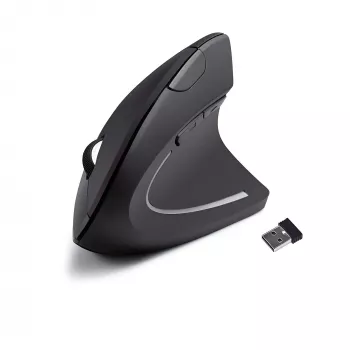
If the goal is a more neutral wrist angle with the flexibility to change cursor speed quickly, Vertical Ergonomic Wireless Mouse with Adjustable DPI for Mac and PC is a simple, budget-friendly option for everyday productivity. It’s designed to support a natural hand position, and the adjustable DPI helps you shift between careful selection work and faster navigation without fighting your settings.
Quick Details
| Item | Details |
|---|---|
| Product | Vertical Ergonomic Wireless Mouse with Adjustable DPI for Mac and PC |
| Price | $3.82 USD |
| Availability | In stock |
| Product page | View product |
Useful Add-Ons for Work and Travel
- 200000mAh 120W Power Bank for iPhone and Apple Devices for longer sessions away from an outlet.
- Leather Texture TPU Case for Apple AirPods 1/2/3/Pro to help protect everyday carry accessories in a backpack or laptop bag.
Getting Used to a Vertical Mouse Faster
FAQ
Does a vertical mouse help with wrist discomfort?
A vertical mouse can encourage a more neutral wrist and forearm position, which may feel more comfortable during long computer sessions. Fit, desk setup, and regular breaks still matter, and a mouse isn’t a medical treatment for underlying conditions.
How do DPI settings affect everyday use?
DPI changes how fast the cursor moves relative to your hand movement. Lower DPI can feel steadier for precise clicking, while higher DPI can make it easier to cross large monitors or multiple screens with less hand travel.
Will it work on both Mac and Windows without extra software?
Basic pointer movement, clicking, and scrolling typically work plug-and-play on both Mac and Windows. You can fine-tune tracking speed in each operating system, though any advanced or extra buttons may behave differently depending on the device.













Leave a comment